At SimplerQMS, we’re always looking for ways to remove friction from quality management so you can spend less time navigating systems and more time focusing on quality and compliance.
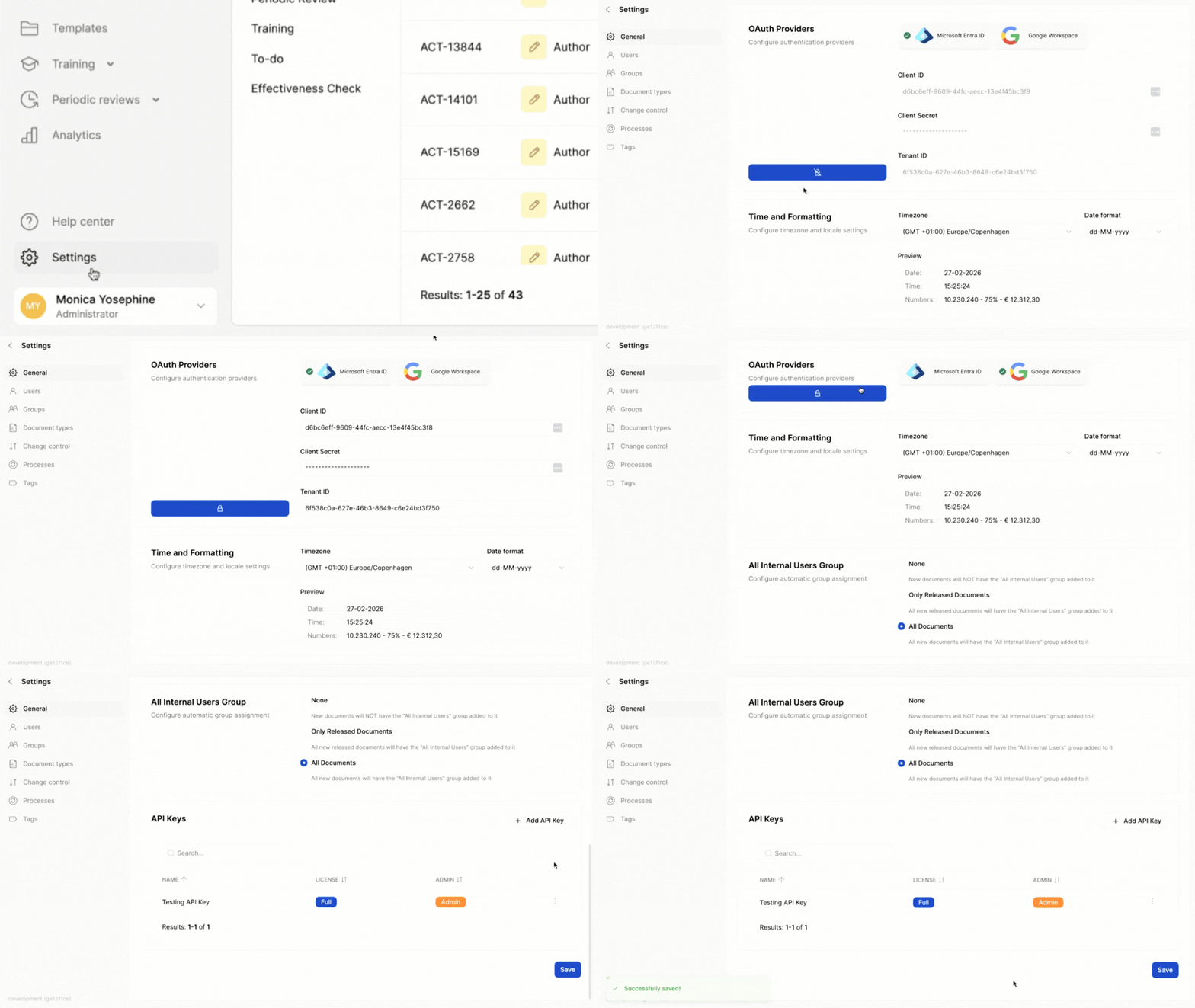
This March, we’re making it easier to access the platform. If your organization runs on Google Workspace, you can now log in to SimplerQMS using Google Workspace Single Sign-On (SSO). This adds Google Workspace as an additional SSO authentication provider alongside Microsoft Entra ID.
Say Hello to Google Workspace SSO
For many organizations, Google Workspace is already part of daily operations. Now, your SimplerQMS login can fit seamlessly into that workflow.
With Google Workspace SSO, your team signs in and authenticates with the credentials they already know and trust, while your IT team maintains full control over access from a single central place.
Here’s what that means for you:
- One less password to manage. Your team logs in with the same secure Google credentials they use across your organization.
- Centralized access management. Your IT team can manage access through the Google Admin console.
- Simpler onboarding. User access can be managed through your existing identity provider, supporting smoother onboarding and offboarding.
- Compliance-ready by design. SSO supports consistent access policies and full auditability, keeping you aligned with FDA 21 CFR Part 11 and ISO 27001 without extra work.
The bottom line? Less friction getting in, more time doing the work that matters.
Ready to get started? Head to Settings > General to update your authentication provider. For detailed setup instructions, check out the full release notes here.
More Control Over Documents and Processes
This month’s release also introduces improvements to help you stay consistent and in control as your QMS grows.
Consistent Document Numbering
You can now standardize document IDs with optional leading zeros (for example, SOP-00001 instead of SOP-1).
The result? Cleaner sorting, easier readability, and stronger traceability across your quality documentation, especially as it scales.
You’ll find step-by-step setup guidance in the full release notes.
More Flexibility for Process Owners
Process Owners can now edit and manage documents within their assigned processes, even if they are not the original document owner or author.
In short? Fewer bottlenecks, faster updates, and documentation that stays accurate without losing clear accountability.
Want to see the updates in action? Book a demo or reach out to your CSM.
