Form and Template Management for Life Sciences
Create and manage standardized forms and templates to support consistent data capture and traceability.
Book a DemoJoin Over 5,000+ Quality Professionals Who Trust SimplerQMS






Form and Template Management In a Complete eQMS
SimplerQMS allows you to simplify the creation and management of all forms and templates and supports compliance with Life Science requirements, such as GxP, ISO 13485:2016, FDA 21 CFR Part 820, FDA 21 CFR Part 11, EU GMP Annex 11, EU MDR and IVDR, and others.
Streamline the process of creating documents using master templates and forms, and automatically include the required information in specified document fields. Use the pre-configured workflow to review, release and automatically retire old versions of forms and templates.
Form and template management is an integral capability of our complete eQMS software solution with all Life Sciences QMS modules, including document control, change management, training management, complaints management, CAPA management, audit management, and more.

Work Seamlessly With Microsoft Office Applications
Work on your documents using familiar Microsoft Office applications, such as Word, Excel, and PowerPoint.
Keep using your existing forms and templates, or use our complimentary package which includes the most commonly used forms and document templates in the Life Science industry.
Effortlessly build new forms and templates, for instance, for change requests, supplier qualifications, audit reports, CAPA forms, and more.
Enable Efficient Workflows and Automated Processes
Automate processes and streamline workflow efficiency by automatically naming, numbering, and versioning documents to save time and improve documentation structure.
Follow pre-configured workflows to create, review, and approve new forms and templates to ensure all information is properly addressed.
Use streamlined workflows that ensure that only the current version is available. This eliminates the stress of having multiple versions of nearly identical forms and templates and enables easy retrieval when needed.

Ensure Compliance with Life Sciences Requirements
Our complimentary form and template package is based on Life Sciences requirements. It can be used as a source of inspiration to create your own forms and templates, or you can use it as-is with minimal adjustments to fit your company’s needs.
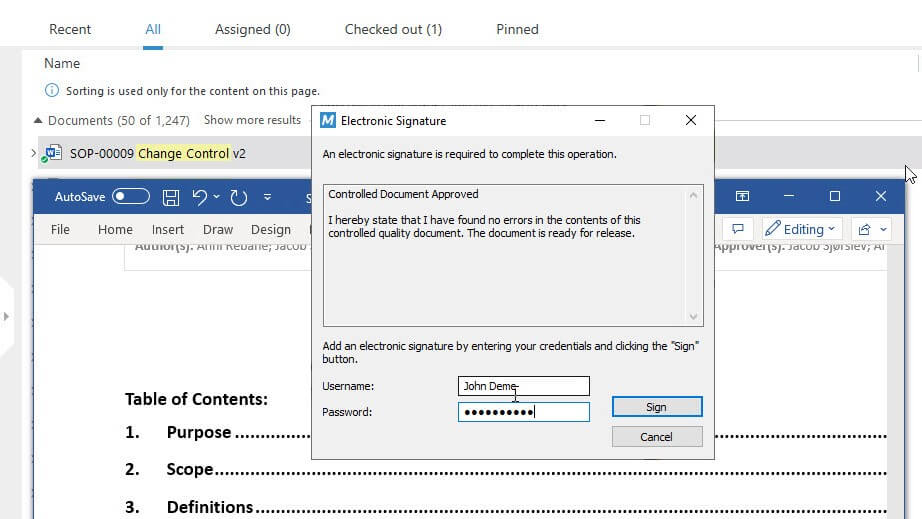
SimplerQMS complies with FDA 21 CFR Part 11, which sets the guidelines for electronic signatures and electronic records, and EU GMP Annex 11, which provides good manufacturing guidelines for computerized systems.
The system automatically records any document change and records data in a time-stamped audit trail for complete traceability.
Link Records to Forms and Templates
Link records to the most recent version of your forms and document templates and ensure they are always up to date.
This also helps you locate documents more quickly when needed and ensure the traceability of information.
For example, you can link your risk management procedure to a corresponding risk management report template or connect your CAPA procedure to the CAPA form.
Or you can easily see which records were created from each template or form.


Set Periodic Document Review Reminders
Easily define dates for periodic document reviews and have automated reminders and notifications to ensure tasks are performed in a timely manner.
Email reminders will automatically be sent to the relevant employees before the scheduled review.
What Customers Achieve With SimplerQMS
“It’s very flexible, smooth, and easy to use. Documents no longer get lost and the whole history of all products is accessible for anyone at any time.”

Discover How SimplerQMS Can Help You
Complete eQMS Software for Life Sciences


Frequently Asked Questions
Form and template management is the process of creating, reviewing, approving, updating, and retiring document templates and forms, such as a Non-Conformance Report (NCR) template, CAPA form, and others.
It also involves making the latest version of the forms and templates available, linking it to relevant procedures, and facilitating its quick retrieval.
Such a process enables companies to maintain the consistency and accuracy of their forms and templates, secure them, streamline workflows, and help achieve compliance with Life Science requirements.
Some of the most popular features are:
- Customizable forms and templates: have the ability to create and customize templates for different types of documents and forms based on the company´s specific needs.
- Version control: control versions of your documents over time and roll back to previous versions if necessary.
- Electronic signatures: use electronic signatures to document responsibilities and justifications for actions performed.
- Automatic notifications: set up automatic notifications to alert personnel when a task is assigned to them.
- Search and retrieval: have the ability to search and retrieve documents using keywords in document titles and content.
- Integration with other applications: use already familiar Microsoft Office applications, such as Word, Excel, PowerPoint, Outlook, etc.
- Pre-configured workflows: follow workflows based on Life Science requirements for quality documents, change requests, and more.
The first step is the form or template creation using SimplerQMS’s complimentary package or uploading an existing form or document template from your local drive using drag-and-drop functionality.
To provide more data security, controlled document templates or forms require change requests to be modified by default in the system. But authors and responsible persons can define whether the document needs change requests to be updated or not.
After drafting the form or template, you can send it to the appropriate personnel within the workflow for review as many times as needed. It is also possible to modify the reviewers’ list or even exclude the review process altogether.
Then, you can send the final document draft for approval and release. The template or form can become effective on a specific date or immediately.
SimplerQMS automatically sends notifications and reminders to notify the relevant people when it requires review or approval actions.
Finally, you can retire forms and templates that are no longer in use.
Our Knowledge Base article about managing templates provides further information on the workflow for you to learn more.
SimplerQMS complies with both FDA 21 CFR Part 11, which outlines the standards for electronic signatures and electronic records. As well as, EU GMP Annex 11, which sets out good manufacturing practices for computerized systems.
The pricing of SimplerQMS software is determined by the quantity and types of licenses you acquire.
SimplerQMS is a complete eQMS software solution that includes all Life Science QMS modules and features for one subscription price. Things like implementation, user training, hosting, and ongoing support, are all included, so you can be sure that once you start using the solution, there will be no surprise costs.
For further information regarding our license types, features, and services included, visit our pricing page.