Equipment Management Software for Life Sciences
Track and maintain equipment to support accuracy, availability, and compliance.
Book a DemoJoin Over 5,000+ Quality Professionals Who Trust SimplerQMS






Robust Equipment Management Software Within a Complete eQMS
SimplerQMS equipment maintenance and calibration software allows you to create an equipment list organized by categories, schedule calibration & maintenance tasks, monitor equipment status, set up automatic reminders for actions, relate specific products to specific equipment, and more.
Equipment asset management module is an integral part of our complete eQMS solution. We offer all core QMS modules in one system, such as document control, training management, change control, Non-Conformance management, CAPA management, audit management, supplier management, and others.

Register Your Equipment With Ease
Easily create new equipment in the system and fill in the relevant information in the metadata card, such as equipment serial number, department, customer, product, software version, responsible person, and more.
Categorize equipment by quality critical or standard type, and schedule periodic calibration and review tasks based on equipment category.
Relate equipment to SOPs, work instructions, protocols, maintenance tasks, and logs to ensure employees know how to use the right equipment to perform specific tasks and ensure traceability.
Schedule Calibration and Maintenance Tasks
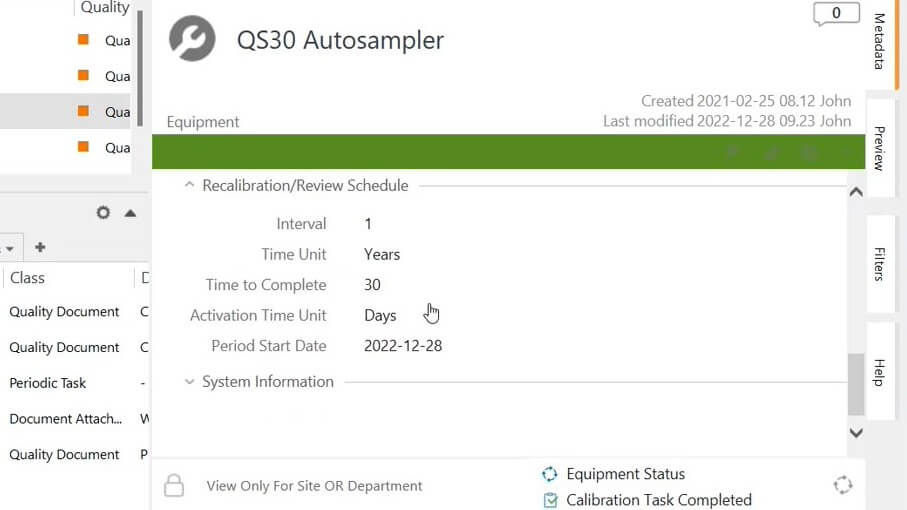
Create calibration and preventive maintenance tasks for quality critical equipment that require periodic calibration and/or maintenance as defined during equipment registration into the system.
Schedule recalibration or review assignments as periodic or one-time assignments. The system automatically notifies the responsible person of the required actions before the due dates.
Set up maintenance tasks for several pieces of equipment at once by selecting a specific equipment category and all equipment within it.
Control maintenance and calibration plans by setting up periodic tasks and assignments, for example, changing batteries, cleaning equipment every two weeks, reviewing the certification, etc.

Monitor Equipment Status
Overview the state of equipment to verify, for instance, if the equipment is still pending calibration or is completely qualified and ready to use.
Add and/or remove data columns as needed to create a personalized view with the most relevant information for your company.
Easily export data from your views to create monitoring reports and perform further analysis on metrics, such as the number of equipment pending calibration, equipment with calibration tasks overdue, equipment by status, and so on. Or overview the trending of this data via KPI reports.
Have a Complete History of Your Equipment
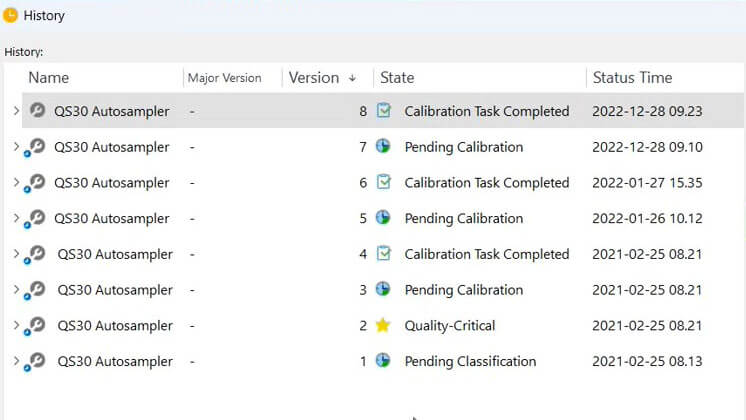
Overview the equipment’s complete history with a few simple clicks.
The system automatically records all changes to an equipment document and creates a complete time-stamped audit trail.
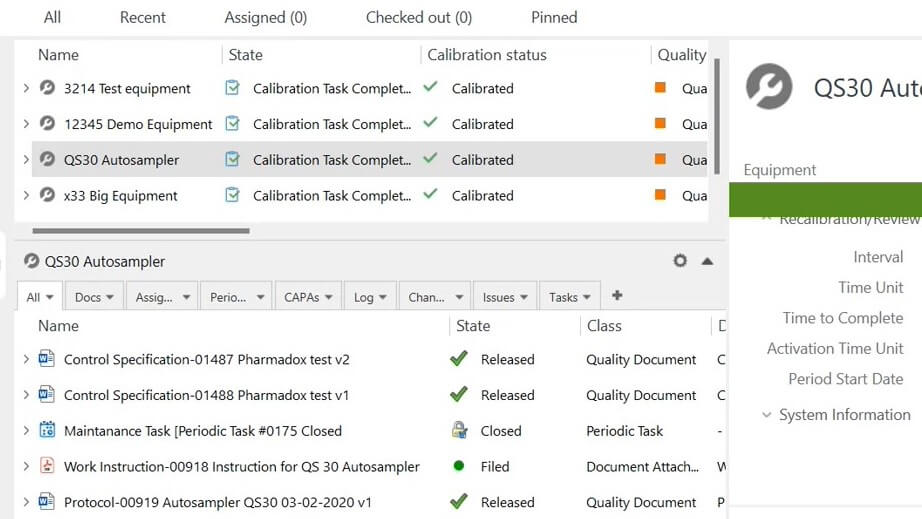
Overview All Relations in One Place
Set up relations and have a detailed listing of all documents linked to equipment, such as assignments, periodic tasks, CAPAs, logs, change requests, issues, etc.
Attach calibration certificates, equipment manuals, and other related documents from an external source to specific equipment using a drag-and-drop feature.
Have all documents in one secure and cloud-based system. The system allows searching for keywords in file titles and content to facilitate document retrieval during audits.
Ensure Compliance With Life Science Requirements
Use pre-configured workflows based on Life Science requirements that support you in achieving compliance.
All actions performed inside the system are automatically recorded – view the author of the action, date, time, process status, and more in a time-stamped audit trail.
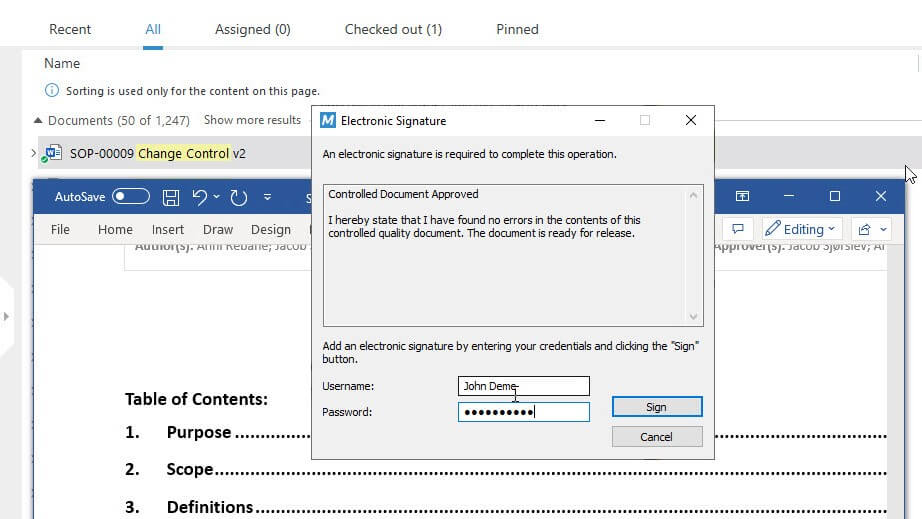
Electronically sign documents using FDA 21 CFR Part 11 and EU Annex 11 compliant electronic signatures.
See Our Equipment Module in Action
Find out how you can manage your equipment in the SimplerQMS equipment management module.
Easily set recalibration and/or review tasks, relate documents, export data, automate notifications and reminders, monitor equipment status by viewing customizable views, and more.
What Customers Achieve With SimplerQMS
“It’s very flexible, smooth, and easy to use. Documents no longer get lost and the whole history of all products is accessible for anyone at any time.”

Discover How SimplerQMS Can Help You
Complete eQMS Software for Life Sciences


Frequently Asked Questions
Equipment Management is a process used to control, monitor, calibrate, and maintain all equipment within a company. It involves managing currently available equipment for use, monitoring the performance of equipment, determining when maintenance and repairs are needed, as well as providing user training for safe and efficient operation.
Effective equipment management is essential to produce reliable results quickly with minimal risk. Poorly managed equipment can lead to production delays, increased costs, and safety issues in the manufacturing process. Proper care of equipment helps ensure its longevity as well as improves overall productivity in the workplace.
Equipment management software is a tool that allows you to streamline the management and control of equipment registration, calibration, qualification, and maintenance tasks.
The software offers a simple way to register new equipment, select relevant equipment categories, schedule calibration tasks, view the equipment history, automate notifications and reminders regarding upcoming activities, relate products to equipment, create maintenance plans, and more.
SimplerQMS equipment management software is an integral part of a complete eQMS solution. We offer all core QMS modules, including document control, change management, training management, and others.
An equipment workflow in the SimplerQMS solution starts with registering new equipment.
You can determine the equipment type between quality critical or standard. In the first case, equipment needs to be calibrated and qualified before approval. Standard equipment does not require calibration and can be approved faster.
The software allows the scheduling of periodic tasks and one-time assignments to ensure calibration, maintenance, cleaning, and/or other related activities are performed on time.
The system automatically notifies assigned people of required actions and due dates.
Equipment can be reclassified, if necessary, and archived when no longer in use.
If you want to learn more about how to manage your equipment in SimplerQMS, please visit the Managing Equipment article, in our Knowledge Base.
Yes, the SimplerQMS software allows you to link documents with ease.
When creating new equipment in the system, you will have the option to relate relevant documents, such as SOPs, work instructions, protocols, and others, when filling out the metadata card. You can also relate equipment with suppliers, customers, departments, sites, and products.
The SimplerQMS solution usually takes five to six weeks to be fully implemented.
The first modules to be implemented are document control, change management, and training management. Afterward, an equipment management module can be implemented.
The implementation time also changes depending on the number of documents that need to be created and/or migrated.
The SimplerQMS Software prices depend on the number of licenses you acquire.
We provide a solution that includes all core QMS modules, implementation, user training, and ongoing support. It is all included in a single license at no extra charge.
As a result, the total cost will depend on the types and the number of licenses you purchase.
If you want to learn more about the license types and everything that is included in SimplerQMS, please visit our pricing page.